PLAYER-ORGANIZED GAMES, LEAGUES & MULTI-ROUND COMPETITIONS

Organizing a Golf Game Shouldn’t Be Harder Than Playing One

GameDay Pro gives organizers one place to manage schedules, formats, participation, pairings, scoring, payouts, results, and standings — while keeping the entire group connected.

✓ Confirm Players
✓ Pair Groups
✓ Score the Round
✓ Publish Results

Join once. Stay connected all season.
No game invitations or codes to keep track of. Players simply access their club’s games and events right from the home screen.

Not pro shop software — a player-first system for games, leagues, golf trips, and recurring groups that replaces scattered texts, spreadsheets, and game-day chaos.

GameDay Pro app preview
🏌️

Group Games

Manage one-time or recurring games for private-club members, public-course groups, skins games, and regular weekly competitions.

📅

Golf Leagues

Manage weekly play, teams, divisions, schedules, scoring, results, and season-long standings for public-course, private-club, corporate, or recreational leagues.

🏆

Golf Trips & Competitions

Organize buddy trips, destination weekends, Ryder Cup-style events, and multi-round competitions with players, courses, formats, teams, scores, match results, and overall trip standings.

If You Organize Golf, You Know the Drill

The round may be simple. Getting everybody organized usually isn’t.

Participation confirmation icon

Before the Round

One organizer is chasing confirmations, tracking dropouts, answering format questions, and trying to build groups from a player list that keeps changing.

Game setup icon

On Game Day

Last-minute changes create confusion around pairings, tee positions, formats, and scoring. Game day turns into a stream of texts and repeat questions.

Scoring and results icon

After the Round

The round is over, but the work is not. Scores, match results, payouts, and standings still have to be calculated and communicated to the group.

There Had to Be a Better Way. So We Built One.

GameDay Pro replaces scattered texts, spreadsheets, paper score sheets, and post-round confusion with one simple game-day workflow.

One Game. Four Simple Steps.

From “Who’s playing?” to final results, GameDay Pro keeps the work moving in one place.

1. Confirm

Players mark themselves in or out, so you know exactly who’s playing before you build the game.

2. Pair

Create groups, teams, pairings, and tee assignments from the players who are actually in.

3. Score

Players enter scores in the app and follow the competition without chasing paper scorecards.

4. Publish

Results, standings, and payout details are available for the group to see without another spreadsheet or text thread.

Demo

GameDay Pro League Setup Demo

Watch how GameDay Pro helps organizers create a league, manage participation, build pairings, create a schedule, and move toward results and standings.

Watch the Demo

Use Cases

Built for Every Type of Organized Golf

GameDay Pro helps organizers run charity outings, recurring member games, leagues, golf trips, and multi-round competitions from one simple workflow.

❤️

Charity Golf Events

Create a Club for your charity, foundation, school, nonprofit, company, or community organization. Invite participants, set the format, build groupings, assign tee positions, and keep players informed.

Returning players can stay connected year after year, helping organizers grow the event without rebuilding the field from scratch.

🏌️

Recurring Member & Inner-Club Games

Replace text chains, paper sign-up sheets, and spreadsheets with one place to manage who is playing, how groups are built, what format is being played, and who won.

Perfect for weekly member games, men’s groups, women’s groups, senior groups, and recurring club competitions.

📊

Golf Leagues

Manage players, teams, divisions, schedules, weekly competition, scoring, results, standings, and communication from one organized league workflow.

Great for public-course leagues, private-club leagues, corporate leagues, and recreational groups.

🧳

Golf Trips

Give trip captains a better way to manage players, rounds, groupings, formats, tee positions, scores, and results across a weekend or destination golf trip.

Less spreadsheet work. Fewer group-text headaches. More time enjoying the trip.

🏆

Multi-Round Competitions

Connect multiple rounds into one larger competition — ideal for golf trips, season-long challenges, Ryder Cup-style events, and groups that play different courses or formats.

Create the competition once, then add each round underneath it. Results from each round can roll up into tour-style standings for the overall competition.

Multi-Round Competition Example

Myrtle Beach Golf Trip

Create the competition once, then add each round underneath it — even when the group plays different courses and different formats. Results from each round award points that roll up into tour-style standings for the overall competition.

🌲
Pine Lakes Best Ball
🌿
Caledonia Match Play
⛳
True Blue Stableford
🏌️
Barefoot Individual
1 Create Trip

Set up the Myrtle Beach competition once.

2 Add Rounds

Add each course, format, and tee setup.

3 Track Results

Scores and points roll into standings.

4 Crown a Winner

Show the overall trip champion.

Different courses. Different formats. One overall competition.

Round Results → Competition Points → Tour-Style Standings → Overall Winner

The Player Home Base

Everything Happens Inside the Game Card.

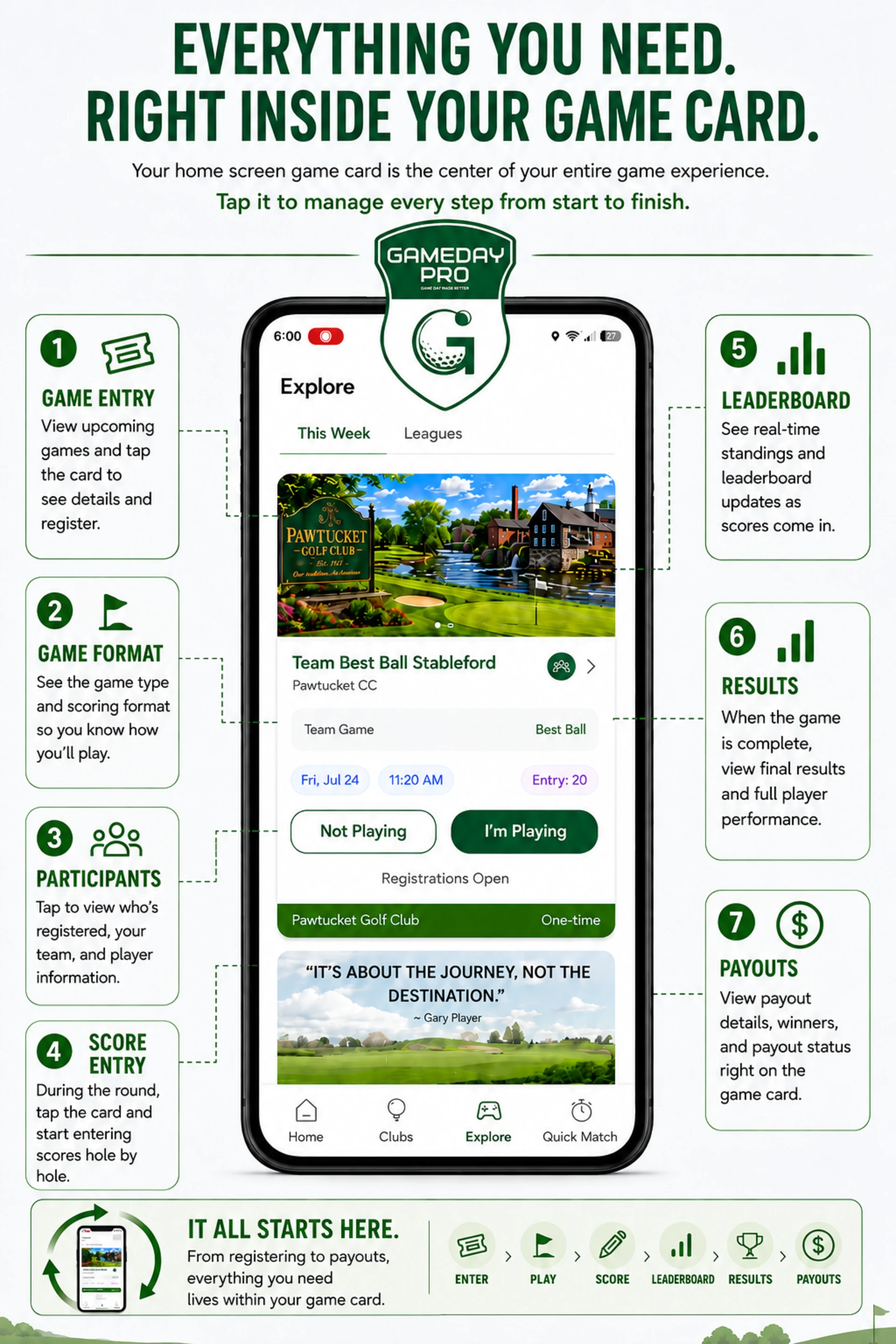
The Game Card is the center of the player experience. Players use it to enter the game, review the format, see pairings and tee positions, enter scores, check the leaderboard, and review results from one place.

No hunting through menus. No scattered texts. One card for the whole game.

Open the Game Card View the game details from the player’s home screen.
Confirm Playing Status Tap I’m Playing or Not Playing before the round.
Review the Format See the game type, scoring setup, and how the round will be played.
See Participants & Pairings View who is registered, plus team, group, or pairing details.
Enter Scores Use the card during the round to start scoring hole by hole.
Follow the Leaderboard See where the other players and teams stand as the round progresses.
Check Results See final results and player performance after the game is complete.
Review Payouts View payout details, winners, and payout status from the same card.
Enter Confirm Format Pairings Score Leaderboard Results Payouts

Play the Formats Your Group Already Plays

Use familiar golf formats for individual games and leagues — and mix formats from round to round inside a multi-round competition.

Best Ball ⛳ Skins ⛳ Match Play ⛳ Nassau ⛳ Quota / Points ⛳ Stableford ⛳ Individual Games ⛳ Team Games ⛳ League Games ⛳ Quick Matches ⛳ Custom Games

Exact available formats may vary by release. Contact GameDay Pro to confirm support for your specific format.

Want to see the workflow?

See GameDay Pro in Action

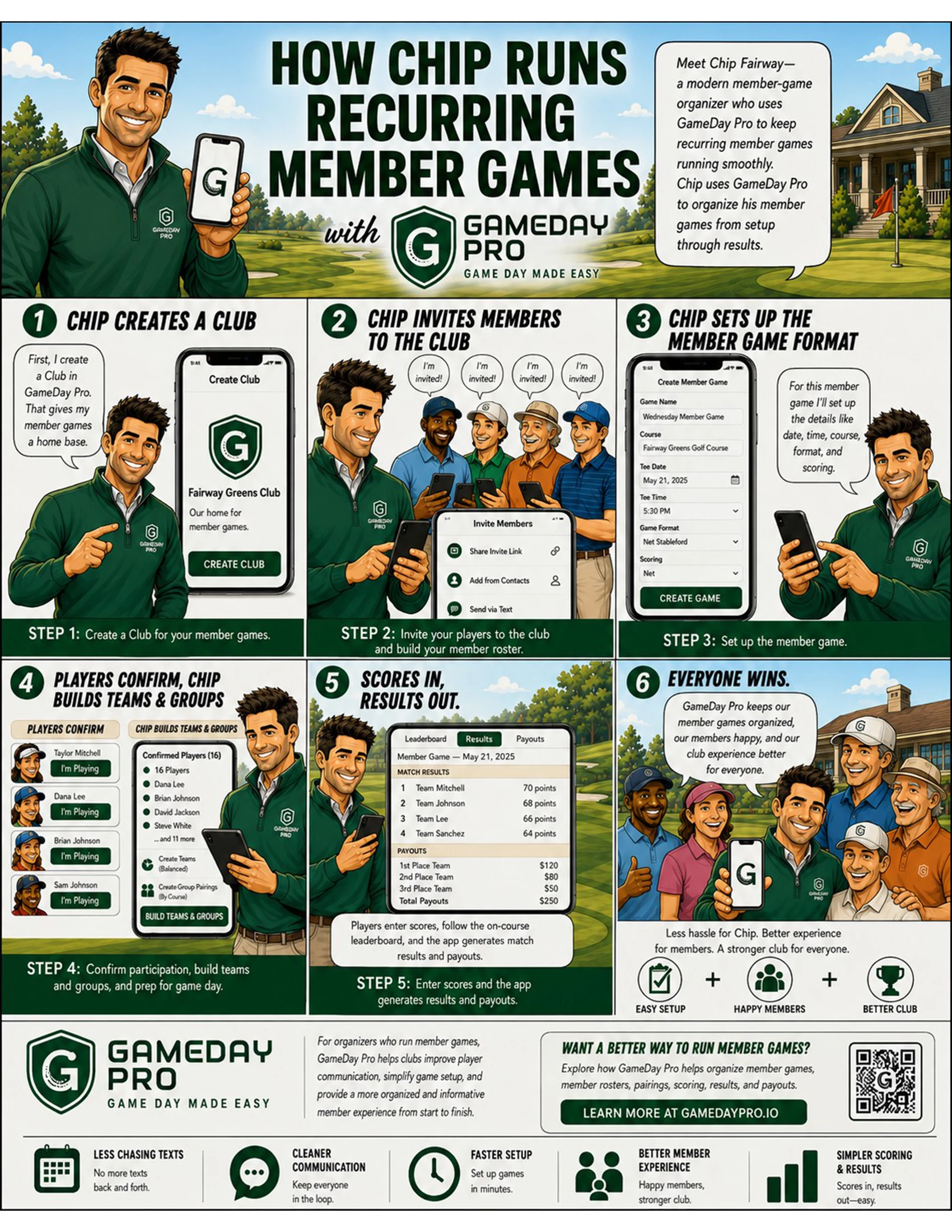
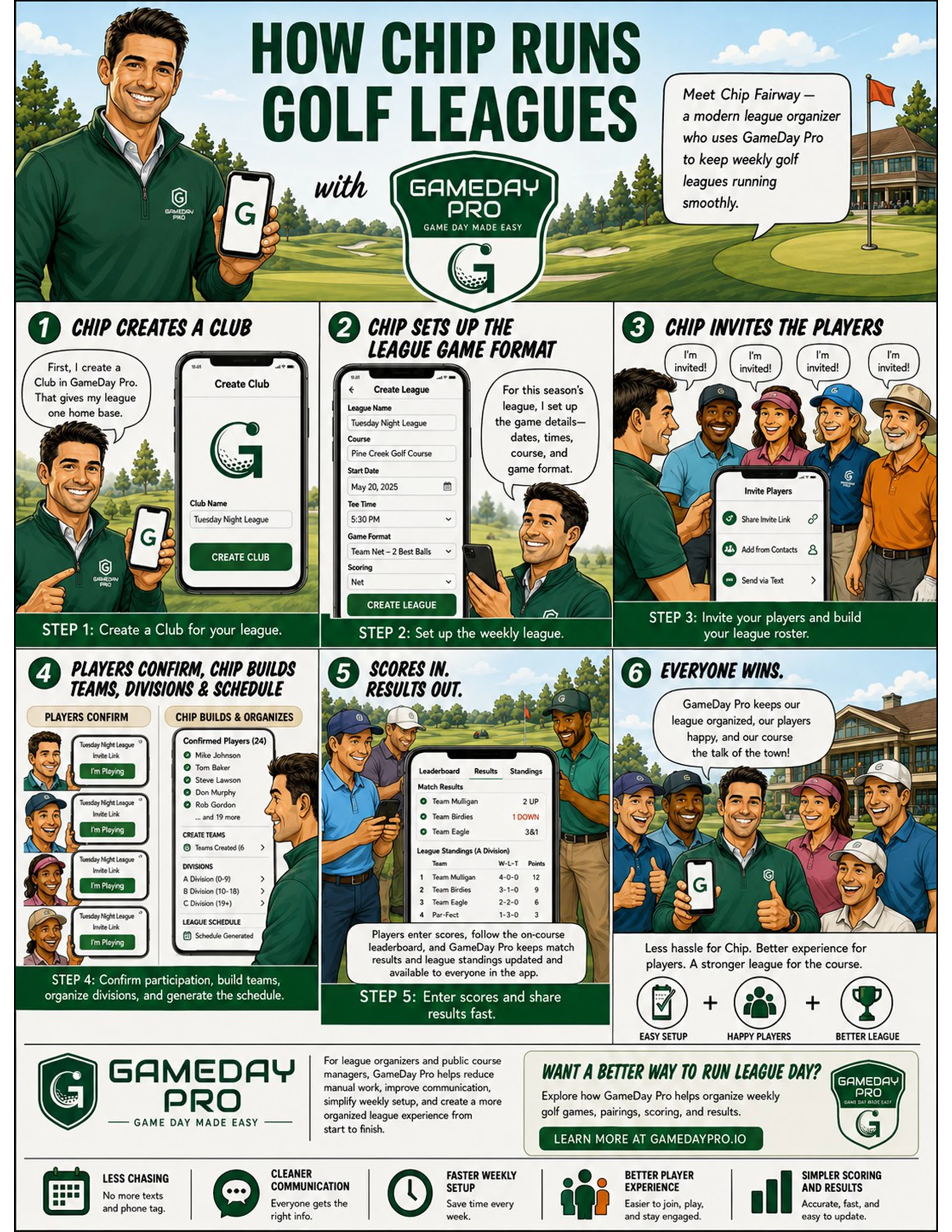
View quick visual explainers for recurring member games and golf leagues.

How GameDay Pro supports recurring member games

Recurring Member Games

See how a recurring game moves from player confirmation through pairings, scoring, and results.

How GameDay Pro supports golf leagues

Golf Leagues

See how a league moves from setup and weekly play through scoring and standings.

For Courses, Clubs & Management Companies

Help leagues, member groups, and recurring golf communities run more smoothly while creating new opportunities for sponsor visibility, referrals, player engagement, and course-level revenue.

Support Organized Golf

Give member games, leagues, outings, and recurring groups a simple tool to manage participation, formats, pairings, scoring, and results.

Increase Sponsor Visibility

Create sponsor placements for leagues, events, golf shop offers, and approved local partners inside the player experience.

Create New Revenue Opportunities

Use subscriptions, sponsorships, advertising, or referral relationships to create incremental value from golf already happening at your facility.

Advertising and sponsorship placements must comply with GameDay Pro advertising policies.

Free to Download. Built Around Your Golf Club.

GameDay Pro is free to download. Golf is organized through Clubs — create a Club, invite your members, and manage your games, leagues, trips, and competitions in one place.

Free for Players

Players invited to a Club can download GameDay Pro, join the Club, confirm participation, view game details and pairings, enter scores, and see results and standings at no cost.

Free for Small Clubs

Anyone can create a Club. Clubs with four or fewer members can be created and maintained at no cost.

Subscriptions for Larger Clubs

Club creators subscribe when maintaining a Club with five or more members. Pricing is based on the anticipated size of the Club.

Subscription packages are available under Club Details → Manage Club after the Club is created.

Flexible as Your Club Grows

Club admins can add individual members beyond their original subscription size without immediately moving to the next subscription level — so you don't have to pay for spots you aren't using.

Every GameDay Pro player can create their own Club. The same Club subscription policy applies.

Download GameDay Pro

Available on the Apple App Store and Google Play.

Need help getting started? Visit Tutorials & FAQs or contact us below.

Contact

Support requests, demo requests, partnerships, questions.

Email

Support: support@gamedaypro.io
Partnerships: partners@gamedaypro.io

Helpful Links

Visit Support for tutorials and FAQs, or review Legal for policies, privacy terms, SMS terms, and advertising rules.

Contact Form


By submitting, you agree to the Legal terms and privacy policies.